Article
Free Timesheet Template: How to Track Hours Without Extra Admin

Short Version
- A free timesheet template in Excel or Google Sheets provides a basic overview but requires manual updates and lacks integration with invoicing.
If you need to track hours for invoicing, payroll, or project follow-up, there are many free timesheet templates available online. The most common are Excel templates and Google Sheets templates that allow you to record date, hours, and project. These templates provide a quick start but require manual follow-up and lack integration with other administration. For companies looking for a solution that both records hours and prepares invoicing directly, a dedicated time tracking system can save time and reduce the risk of forgetting or incorrectly recording hours.
What Do You Get with a Free Timesheet Template?
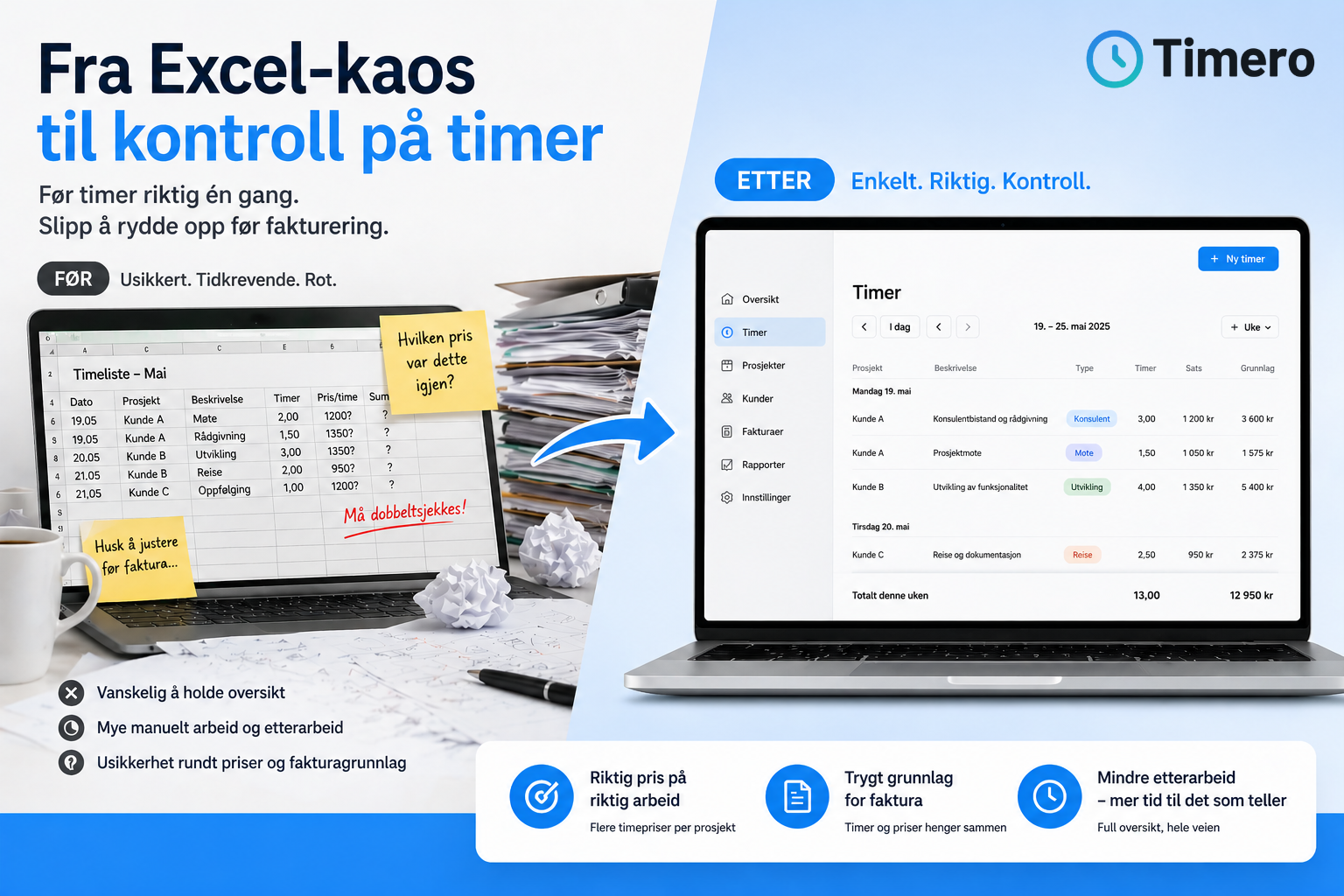
A free timesheet template provides a ready-made structure with columns for date, project, client, number of hours, and any description. You can download the template, open it in Excel or Google Sheets, and start tracking hours the same day. The template works well for simple needs, especially if you work alone and have few clients or projects.
The downside is that you have to manually update the template every time you work. You need to remember to fill in hours as you go, and if you forget to record work immediately, the overview quickly becomes outdated. Many also find that hours need to be transferred to another system when it’s time for invoicing or payroll processing. This double work takes time and increases the risk of errors.
How a Digital Solution Simplifies Time Tracking
Instead of manually filling out an Excel template, you can use a time tracking system that automatically collects hours, clients, projects, and invoicing in one place. With a digital solution, you register hours directly in the app or on the web, and the data synchronizes automatically. You don’t have to remember what you did yesterday or last week because hours are recorded continuously.
When the hours are in the system, you can generate timesheets per client, per project, or per month with just a few clicks. You get an overview of what has been invoiced, what remains, and whether the project stays within budget. For companies that invoice hours to clients, this saves a lot of time compared to creating invoicing from an Excel file.
What Characterizes a Good Time Tracking Solution?
A good time tracking solution should be easy to get started with and not require training or complicated setup. It should work both on mobile and on the web, so you can register hours where the work happens. The system should also support various work methods, whether you use a stopwatch, track hours manually, or register breaks along the way.
Integration with invoicing is crucial for companies that sell hours. If you have to transfer data manually from the timesheet to the invoicing tool, you lose much of the efficiency gain. A solution like Timero allows you to go directly from time registration to completed invoicing without intermediate steps.
Features That Make Time Tracking Easier
- Automatic synchronization between mobile and web
- Stopwatch, manual entry, and break function
- Real-time overview per client and project
- Reports showing time usage, payroll basis, and billable hours
- Direct integration with invoicing to avoid double work
- Easy startup without a credit card or commitment
From Excel to System – What Changes?
When you move from an Excel template to a digital solution, the workflow changes. Instead of remembering to fill out a spreadsheet every evening, you register hours while you work. You receive alerts if hours are not recorded, and you can see directly if you are on track with budget and time usage.
For companies with multiple employees, a system like Timero also allows for role management, so managers can follow up on projects and time usage without having to collect spreadsheets from everyone. Employees register hours themselves, and data is automatically compiled into team overviews and reports.
Another advantage is that you get history and documentation. If a client questions billed time, you have a complete overview of what has been recorded and when. This provides security for both you and the client.
Free to Get Started – Upgrade When You Need More
Many digital time tracking solutions offer free startup, allowing you to test if the system fits before you pay. Timero has a free plan with unlimited time tracking and up to 2 projects. You don’t need a credit card to get started, and you can upgrade to a paid plan when your business grows or you need more features like invoicing, project economy, or team management.
For consultants, craftsmen, and small businesses looking to replace Excel templates with a solution that actually saves time, a digital time tracking solution is a natural next step. You get better oversight, less administration, and assurance that all hours are recorded and invoiced.
Frequently Asked Questions
Where can I find a free timesheet template in Excel?
You can search for "free timesheet template Excel" online and find several downloadable templates. The templates usually contain columns for date, client, project, and hours. These are easy to use but require manual updates and lack integration with invoicing.
What is the advantage of a digital time tracking system over Excel?
A digital system consolidates time registration, projects, and invoicing in one place. You avoid double work, get real-time insights into time usage, and can generate invoicing directly from the hours recorded. This reduces the risk of forgetting or incorrectly recording hours.
Does it cost money to use Timero?
Timero has a free plan with unlimited time tracking and up to 2 projects. You don’t need a credit card to start. Paid plans start from 49 NOK per month excluding VAT and provide access to more projects, invoicing, project economy, and team features.
Can I use Timero on mobile?
Yes, Timero works on both web and mobile app for iOS and Android. Hours synchronize automatically between devices, allowing you to register hours where the work happens and follow up at the office.
Is Timero suitable for companies with employees?
Yes, Timero has team features that allow employees to register hours themselves, while managers get real-time oversight of time usage, projects, and payroll basis. The team plan includes 5 users and costs 399 NOK per month excluding VAT, with 49 NOK per month excluding VAT for each additional user.
How do I ensure that all hours are recorded?
By registering hours continuously instead of retrospectively, you reduce the risk of forgetting hours. Digital solutions like Timero make it easier to track hours along the way using a stopwatch or manual entry directly from mobile or browser.
What happens if I forget to record hours one day?
With Timero, you can manually enter hours retrospectively. You select the date, client, and project, and record the time spent. The system gives you an overview of what has been recorded, so you can easily see if anything is missing.